
Pilot Logbook Features
- Visual night calculation system
- Modern sleek interface
- Comprehensive totals tracking
- Aircraft-specific breakdowns
- Seamless data import / export
- Currency tracking
- Professional printing format
- Google Sheets backup
- Complete airport database
- User-specific aircraft editor
- Distance calculations
- Smart time auto-population
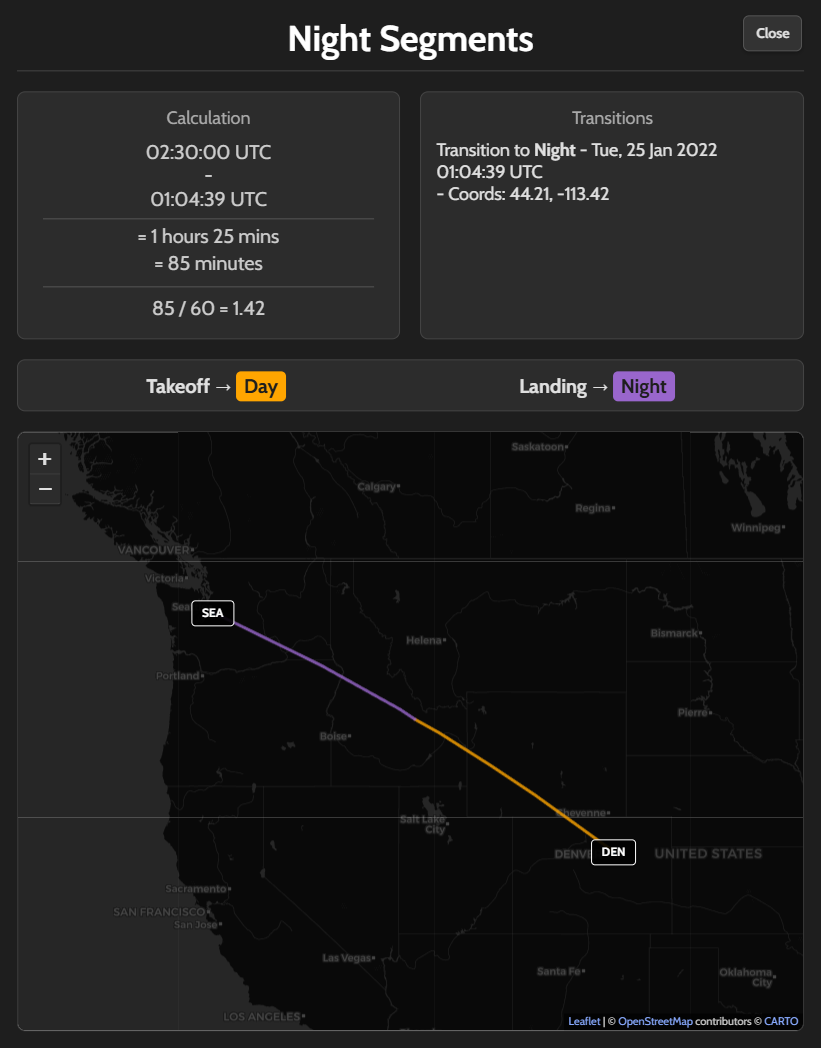
Visual Night Calculations - The "Luma" Feature
LumaLogbook's signature feature and the reason for its name. Unlike traditional logbooks that rely on guesswork, LumaLogbook automatically calculates exactly how much of each flight occurred during night versus day according to FAA definitions. Using precise sunset and sunrise times for your route's coordinates, the system generates a visual map showing exactly where and when your flight transitioned between day and night. See the exact moment, coordinates, and calculations for each transition - ensuring accurate night currency tracking with complete confidence and zero manual work. And of course, you can always manually adjust the automatically populated times as required.
Modern Sleek Interface
LumaLogbook's interface is meticulously designed for professional pilots who spend hours managing their flight records. The dark-mode color scheme combines deep navy backgrounds with crisp white text for exceptional readability and reduced eye strain during extended sessions. Accents guide your attention to important features without creating visual clutter. Modern design elements including smooth glass-like effects, custom scrollbars, fluid transitions, and thoughtful spacing create a polished, premium experience. Clean professional typography ensures every number and letter is sharp and easy to read at any size. The interface features rounded corners, subtle depth shadows, and refined borders that add visual sophistication while keeping everything clean and uncluttered. Whether you're on desktop, tablet, or mobile, the responsive design adapts seamlessly to provide the same high-quality experience.
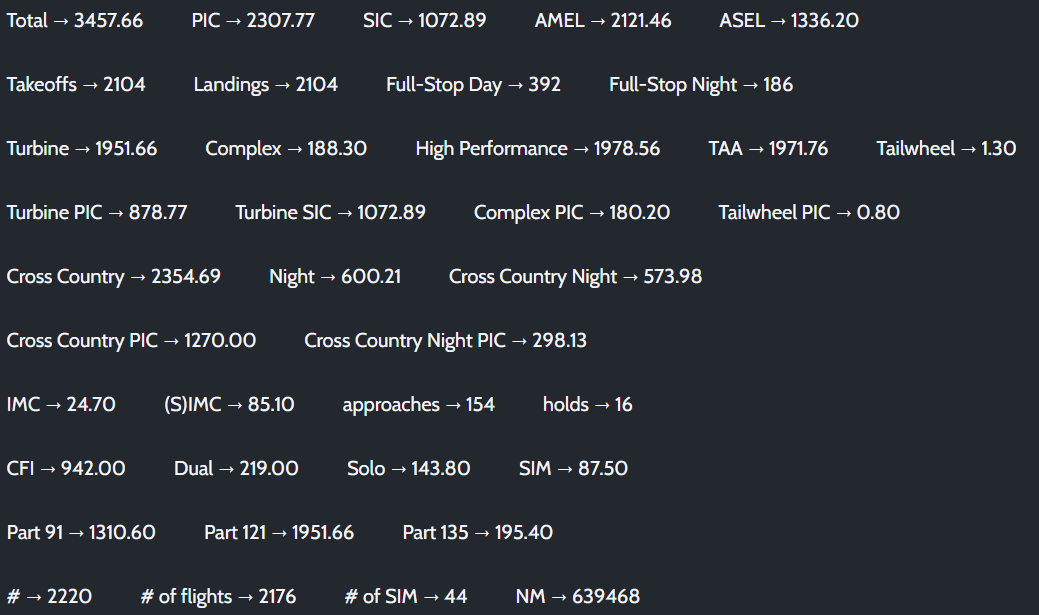
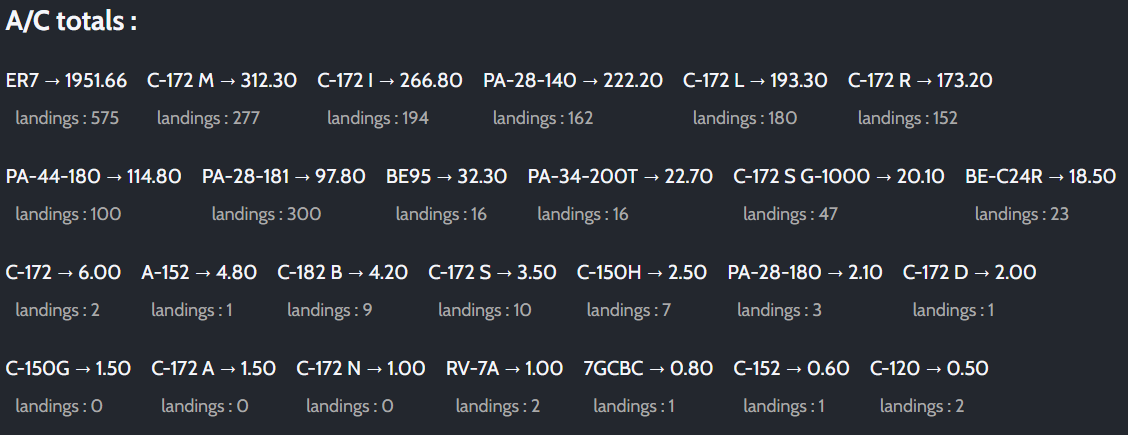
Comprehensive Totals Tracking
LumaLogbook tracks totals far beyond what traditional logbooks offer. While basic totals like PIC, SIC, cross country, night, and instrument time are standard, LumaLogbook automatically tracks aircraft-specific attributes by linking to your aircraft database - turbine, complex, high performance, TAA, and tailwheel time are calculated automatically without manual entry. The system goes further with attribute-specific breakdowns like Turbine PIC, Turbine SIC, Complex PIC, and Tailwheel PIC. Unique intersection totals calculate time that meets multiple criteria simultaneously, such as Cross Country Night (time that was both cross country and night), Cross Country PIC, and Cross Country Night PIC. Operations are categorized by Part 91, 121, and 135. Additional metrics include separate takeoff tracking if desired, full-stop day and night landings vs touch and go for currency, total nautical miles flown (automatically calculated from your routes), number of flight entries, and detailed per-aircraft totals with aircraft specific landings. The time range filter allows you to view totals for any custom period - last 6 months, year, or specific dates - perfect for applications, recency requirements, or insurance documentation. Everything updates in real-time as you log flights, ensuring your totals are always accurate and complete and mistakes are easily fixed retroactively.
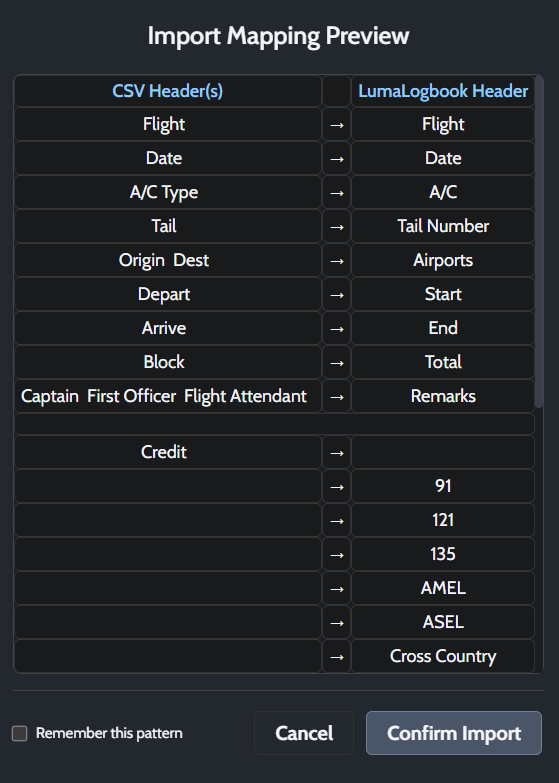
Universal Import with Smart Mapping
Switching to LumaLogbook from any other logbook system is seamless with the intelligent import mapping feature. Export your current logbook to CSV format from any logbook application, and LumaLogbook handles the rest. The smart auto-mapping engine recognizes dozens of common header variations for each field, automatically detecting columns regardless of naming conventions. For example, "Total", "total_time", "block", "block_time", and "Total Flight Time" all automatically map to the correct field. The intuitive drag-and-drop interface displays your CSV headers alongside LumaLogbook headers, with automatic mappings already suggested. Simply drag any header to adjust the mapping if needed, or double-click to unmap. Special handling intelligently combines Origin and Destination into the Airports field, and groups related fields like Captain and First Officer into Remarks. Multiple CSV columns can map to grouped fields when appropriate. The visual preview clearly distinguishes between mapped and unmapped columns, ensuring you don't miss any data. Once you confirm, the "Remember this pattern" option saves your mapping configuration, making future imports from the same source instant and effortless. No data reformatting required, no manual column matching - just export from your old logbook and import to LumaLogbook.
Export & Backup - Your Data, Your Way
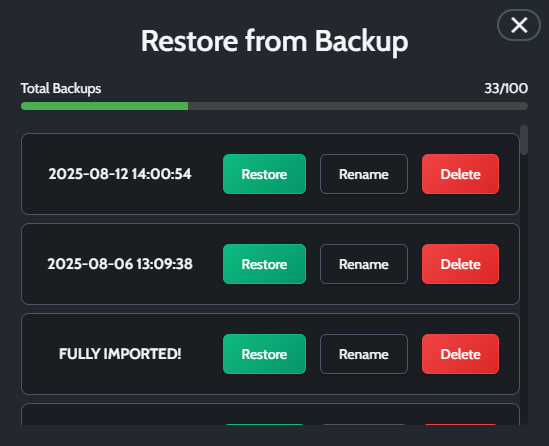
Your flight data is valuable, and LumaLogbook ensures you maintain complete control and security. With one click, export your entire logbook as a CSV (comma-separated values) file that downloads directly to your computer - perfect for importing to other applications, submitting to airlines, sharing with insurance companies, or simply keeping an offline copy. The export automatically generates a clean, dated file (e.g., logbook_2024-12-05.csv) with all your flight data in a universal format that opens in Excel, Google Sheets, or any spreadsheet application. For cloud backup, the integrated Google Sheets feature lets you upload your complete logbook directly to your Google Drive with a single click. After a simple one-time authorization, LumaLogbook creates a new spreadsheet in your account with all your flight records. Each backup creates a separate dated spreadsheet, giving you multiple snapshots of your logbook at different points in time - accessible from anywhere and protected by Google's infrastructure. The built-in backup and restore system also saves your logbook data, allowing you to restore previous versions if needed. Whether you need portability, redundancy, or peace of mind, your logbook data remains safe, accessible, and completely under your control. Export to CSV for maximum compatibility, backup to Google Sheets for cloud security, or use the internal backup system for snapshots - or all three for complete protection.
Professional Printing Format
Print your logbook in a clean, professional format suitable for checkrides, airline applications, or permanent paper records. The three-section printing approach separates Totals, A/C Totals, and Logbook pages to prevent formatting issues. Each logbook page includes running totals showing Page Totals, Amount Forward from subsequent pages, and Totals to Date. A signature section appears on every page with "I certify these times are true :" and a signature line. Pages are numbered and print in landscape orientation on standard Letter 8.5x11 paper. Your custom column widths automatically scale to fit the page while remaining readable, with professional borders and shaded headers. Long airport routes, aircraft names, and remarks wrap naturally without cutting off. Print to paper for physical records or save as PDF for digital archives. The format supports two-sided printing, and you can preview everything before printing. Adjust column widths by dragging headers if needed. Whether preparing for a checkride, submitting records to an airline, or keeping backup paper logs, the professional format presents your logbook clearly and completely.

Automatic Currency Tracking
Stay current with automatic tracking of all flight currency requirements. LumaLogbook monitors Day Currency (3 takeoffs and landings in 90 days), Night Currency (3 takeoffs and full-stop landings during night hours in 90 days), Instrument Currency (6 approaches and 1 hold in 6 calendar months), and Tailwheel Currency for applicable aircraft. Each currency section displays a table showing your aircraft, current status with visual checkmarks or X marks, and exact expiration dates. The "Type Required" checkbox lets you choose whether currency applies to a specific aircraft type or the broader category and class. Night currency integrates with the visual night calculation system, using actual civil twilight times for your routes to determine which landings count toward currency. Instrument currency separately tracks approaches and holds, showing counts for each and overall status. Tailwheel currency automatically identifies tailwheel aircraft in your logbook and tracks their specific requirements. The system continuously calculates from your logged flights, updating currency status and expiration dates in real-time. No manual counting, no missed expirations - just open the currency window to instantly see where you stand across all requirements.
Complete Airport Database - Over 83,000 Airports Worldwide
LumaLogbook includes a comprehensive airport database with over 83,000 airports worldwide, each with precise latitude and longitude coordinates. Search for any airport by ICAO code, IATA code, or local identifier - the system instantly finds your airport and uses its real-world coordinates for all calculations. These coordinates power the automatic distance calculations between airports, determining exact nautical miles flown for each leg. The coordinates also drive the visual night calculation system, using your route's geographical position to calculate precise civil twilight times at each point along your flight path. Cross-country flight detection uses the coordinates to automatically determine if your flight has a segment that is at least 50 nautical miles. When you enter an airport code in your logbook, the system looks it up in the database and pulls the coordinates behind the scenes - no manual entry needed. For airports not in the database, or private strips, you can add your own custom airports with manual coordinate entry. Your personal airports integrate seamlessly with the global database and take priority when searching. Whether you're flying between major international hubs or visiting remote airstrips, the complete airport database ensures every calculation - distance, night time, and cross-country qualification - uses accurate real-world coordinates.

User-Specific Aircraft Editor
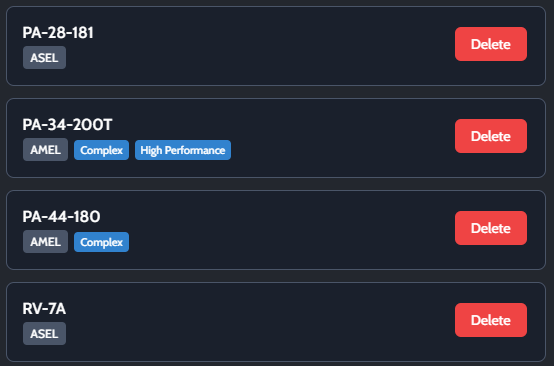
Build and maintain your personal aircraft database with the dedicated aircraft editor. Each pilot has their own separate aircraft list, completely isolated from other users - your aircraft, your data. Add any aircraft type you fly by entering its name and selecting its category. The editor tracks five critical aircraft attributes that determine how flight time is categorized: Turbine, Complex, High Performance, TAA, and Tailwheel. Simply check the boxes for each attribute your aircraft has, and LumaLogbook automatically calculates attribute-specific totals when you log flights in that aircraft. For example, if you mark an aircraft as Turbine and Complex, every flight in that aircraft automatically contributes to your Turbine time, Complex time, Turbine PIC, and Complex PIC totals without any manual tracking. The simulator toggle lets you designate training devices separately, ensuring simulator time is tracked distinctly from actual aircraft time. Once you've added an aircraft, just type its name when logging a flight and the attributes flow through automatically. All totals are dynamically calculated based on your aircraft attributes, so if you discover an error - perhaps you forgot to mark an aircraft as Complex or incorrectly set it as Turbine - simply update the aircraft attributes and your totals instantly recalculate across your entire logbook history. No need to manually adjust past entries or recalculate totals yourself. The "View My Aircraft" window displays all your saved aircraft and simulators in one place, showing each aircraft's category and attributes at a glance. You can edit any aircraft to update its attributes as needed. Whether you fly a single Cessna 172 or an entire fleet spanning multiple categories and types, the aircraft editor ensures your totals accurately reflect the specific characteristics of every aircraft you log.
Try all features for free, $5/month for unlimited entries.